
Call handling
A practice phone line that never interrupts a treatment
Answering the phone means interrupting a treatment. Not answering it means losing the enquiry. So every call to your Movari number goes to voicemail, gets transcribed and summarised, and lands in a triage inbox you clear in a few minutes. Not one of the practice management products we compare against covers the phone at all, so the usual answer is a separate answering service on a separate bill. Movari includes it in the £29, and never bills you by the call.
Your own UK practice number
- A UK local number for your practice, claimed inside Movari. Put it on your website, your cards and your Google listing.
- Every call goes to a personalised voicemail and never rings you and your personal mobile stays yours, for the patients you have chosen to give it to.
Callers hear you, not a robot
- You record your own greeting in the browser. No phone menus, no synthesised robotic voice, no "press one for".
- It is one recording, between two and thirty seconds, and there is a suggested script on screen if you want one. That is the whole setup.
- A number won't go live until you've recorded your greeting, so a caller never reaches a blank line.
- Callers get a real voice and a clear expectation. That is 99% of what most triage services were doing, at a cost to you.
A transcript and a one-line summary, waiting for you
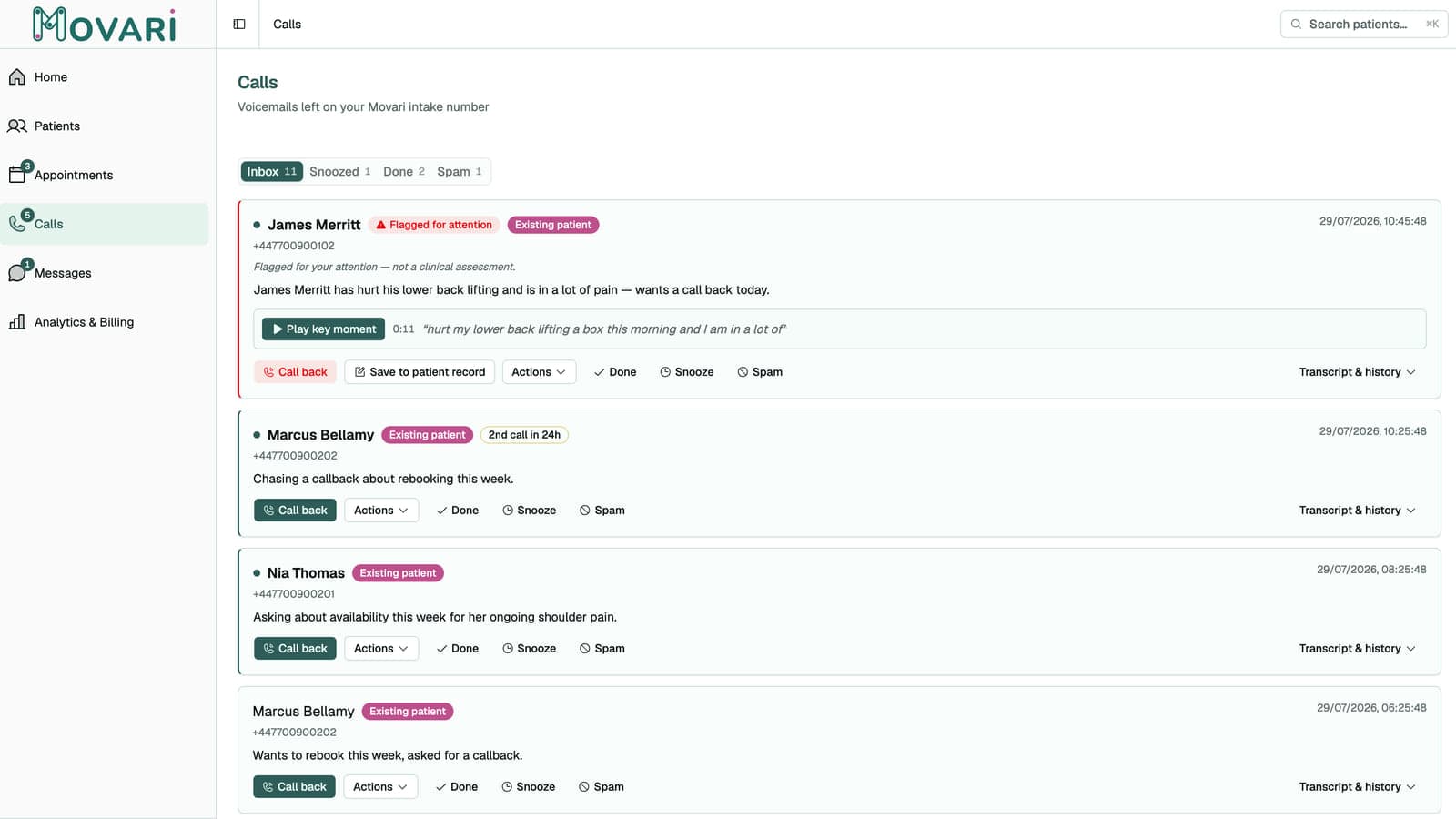
- Every voicemail is transcribed and summarised by Movari, so you read a call in seconds instead of listening to ninety of them.
- Badges tell you what you are looking at before you read, e.g. existing patient, new caller, 2nd call in 24h, likely spam.
- Transcription and summarising are done by secure, UK-based AI.
- A "proof snippet" plays the exact few seconds the summary came from, with the matching words highlighted so you can check it fast, rather than blindly trust the machine.
Triage in the gaps, not in the evening
- Each call gets one of three dispositions: Done, Snooze, or Spam. Snoozed calls come back at 8am the next day.
- Call back with one tap using your usual phone dialler, so the patient sees your usual number.
- On-call tools sit next to the transcript: create the patient, book them in, or save the call into their clinical record without leaving the screen.
- Realistically this is a few minutes over coffee, not a job. There is no unmanageable queue that grows while you treat.
- Nothing chases you. No email, no SMS, no push notification. Just a count in Movari when something is waiting.
The one that cannot wait
- When a message reads as urgent, a banner surfaces it at the top of the app rather than leaving it in a list.
- It is labelled "Flagged for your attention — not a clinical assessment", and we mean that literally. It is a prompt to look sooner, never a judgement about the patient.
- Nothing is hidden or held back to make room for it. Every call is in your inbox either way; the flag only changes what you see first.
- You dismiss it and it stays dismissed for that call. The flag also clears itself once you have opened the call, because at that point you have seen it.
If you already have a practice number
- Set up a call-divert at your current phone provider so calls to your existing number land on the Movari one (configured at their end, not ours).
- Movari does not port numbers or forward calls. Your Movari number is a new, separate line, and your own number carries on working exactly as it does today.